Frequently Asked Questions
Everything you need to know about finding your tickets, creating an account, and storing them on your phone.
What if I can’t find my ticket?
All tickets are emailed to the email address as it was entered at checkout. Start by searching your email (including spam and promotions folders) for “Batavia Fine Arts Centre Thank you for your recent ticket purchase.” That is the confirmation message with your tickets attached.
Don’t see anything there? Log into your account via the patron portal using the email you used to purchase. From there, you can access all your past orders and re-download your tickets. Still stuck? Contact us and we’ll help.
How do I set up an account?
Click “Patron Login” at the top of the page, then choose “Create Account.” Use the same email you used when purchasing your tickets for easy access to your orders.
Can I add my tickets to my Apple or Google Wallet?
Yes! Once you open your ticket email or access your ticket through your account, you’ll see an option to add it to your Apple Wallet or Google Pay. Tap the link, and you’re set! 👉 Be sure to add each individual ticket to the appropriate patron’s wallet — this ensures everyone in your group has their own ticket ready at the door.
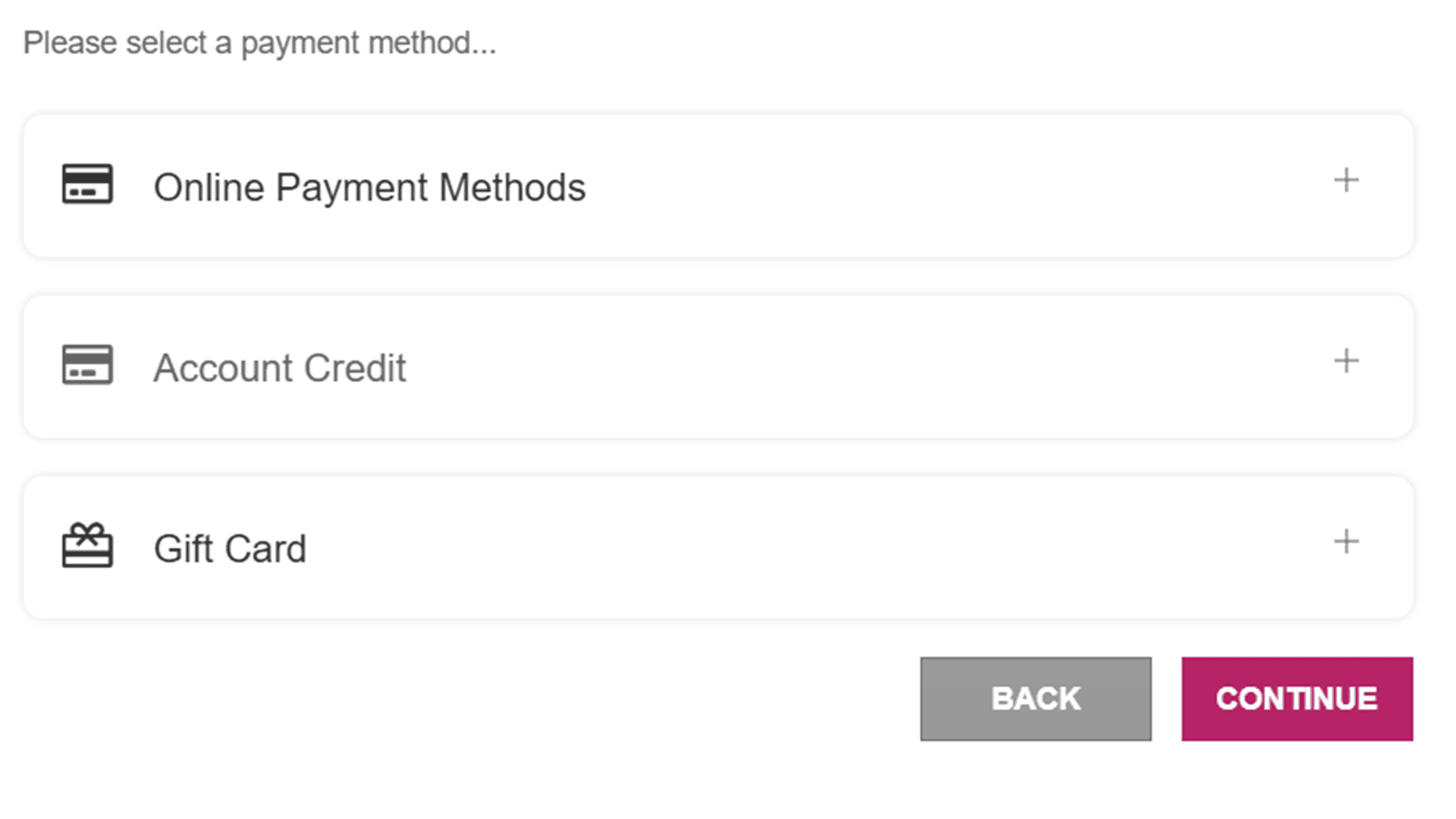
If you have an account credit available, an Account Credit option will automatically appear during checkout. This option only appears if a credit exists on your account.
During the checkout process, you will see Account Credit listed between Online Payments and Gift Card as a payment option. Simply select Account Credit to apply your available credit to the transaction you are currently completing.
If you do not see the Account Credit option, it means there is no credit currently available on your account.
🤝 Heading to the show with friends or family arriving separately? Here’s how to share your tickets smoothly and securely:
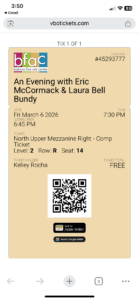
📱 Best Option: Send a Screenshot
The easiest way to share your tickets is to take a screenshot of the ticket and send it to your guest.
Be sure the screenshot includes:
- The QR code
- The door, section, row, and seat number
✔️ Important: Once a ticket has been scanned at the door, it cannot be scanned again. Please keep track of which tickets you’ve shared and who has them.
🖨️ Printed Tickets? Leave Them at the Box Office
If you’ve printed your tickets, you may leave extras at the box office under the name of the guest who will be picking them up.
⏰ Please note: Box office staff remain on-site only through intermission, so make sure your guests arrive at least 20 minutes before curtain to collect their tickets.
Questions about changing your tickets, refunds, and saving on group purchases? Start here.
Can I exchange my tickets?
In most cases, yes! You can exchange your tickets by logging into your patron account and selecting the order. If the performance allows exchanges, you’ll be able to select new seats and pay any difference. For help, contact our box office.
🔁 Can I get a refund or credit?
All sales are generally final. However, if there’s an emergency or special circumstance, reach out to us — we’ll do our best to assist.
Any performance which is canceled, not postponed, will receive the option for a refund within 14 business days.
If your performance is still in the future, we offer several flexible options depending on the type of ticket you purchased and how far in advance you contact us:
More than 30 days before the performance:
- Season Ticket Holders: May exchange, switch to a different performance, or request stored credit — no fees.
- Single Ticket Holders: May exchange or request stored credit (fees apply).
7 to 29 days before the performance:
- Season Ticket Holders: Still enjoy the full flexibility above.
- Single Ticket Holders: May exchange or request stored credit. (fees apply)
24 hours to 7 days before:
- Season Ticket Holders: Still enjoy the full flexibility above.
- Single Ticket Holders: Exchanges only, with fees.
👥 Are there discounts for groups?
Yes! We offer group discounts for many performances. Typically, groups of 10 or more qualify, though availability and discount amounts may vary based on the type of performance, renter, or event.
To learn more or to book a group, please contact the box office — we’re happy to help you plan your visit!
🚗 Parking Information
We offer 250 parking spots directly on-site, with additional auxiliary lots on property and street parking available along Western Avenue.
For most events, our on-site parking is sufficient. However, during evenings with multiple events happening across campus, parking may become limited. In these cases, you may need to utilize street parking or our auxiliary lots.
To ensure a smooth experience:
- Arrive at least 20 minutes before your scheduled performance time.
- Doors open:
- 30 minutes prior for in-district events (such as school concerts or recitals)
- 45 minutes prior for ticketed national tours or rental performances
We appreciate your early arrival to help ensure you find a spot and are comfortably seated before the show begins. When arriving late, patrons will be guided to alternate seats to avoid performance interruption.
🎥 Watch: What Your Visit Looks Like
Take a look at our short video walkthrough—from the moment you arrive to the moment the lights dim.
What you need to know about food and drinks at the theatre.
Do you have concessions?
Yes! We offer a variety of concession options, which vary depending on the event type, performance, or renter. Selections can range from simple favorites like candy, chips, and soft drinks to more elevated options like pizza, burgers, and appetizers.
Be sure to check out our creative and upgraded menu offerings the next time you visit , and come early to explore what’s available!
Alcohol is prohibited by law on the premises.
Can I bring snacks and drinks into the theatre?
Food and beverage procedures vary by event. To provide the best experience for our patrons while protecting our facility and meeting artist requirements, each event is assigned one of three access levels.
🟠 Orange – Limited Access
Typically used for dance competitions, district events, and performances requiring additional protection of the venue.
- Sealable personal beverage containers are permitted.
- Clear, disposable water bottles up to 16 oz are allowed.
- No food or other beverages are permitted inside the theatre.
🔵 Blue – Guest Access
Typically used for national touring productions and approved rental events.
- NO OUTSIDE FOOD OR DRINK IS PERMITTED ON SITE AND SHOULD BE EMPTIED OR THROWN AWAY OUTSIDE PRIOR TO ENTERING THE BUILDING.
- Personal beverage containers may be brought into the building empty and filled with beverages purchased at BFAC concession stands.
- Clear, disposable water bottles purchased at BFAC concession stands are permitted.
- Approved “On Stage” concession food items may be taken into the theatre.
- “Off Stage” concession menu items must be consumed in the Lobby.
- Outside food and beverages are not permitted on site.
🟢 Green – Open Access
Typically used for Black Box performances, on-stage events, and select educational or casual programs.
- Food and beverages may be permitted, depending on the event.
- Concessions and personal beverages are generally allowed as appropriate for the performance, conference, meeting, or event.
The access level for your event will be listed on the event webpage, included in pre-show communications when applicable, and posted at the venue. If you have any questions, our Patron Experience Team will be happy to assist you.
Why do procedures vary?
Different performances have different needs. These event-specific procedures help us:
- Protect our theatre, flooring, seating, and technical equipment.
- Meet the requirements of touring artists and event organizers.
- Provide the best possible experience for every guest while maintaining a safe and welcoming environment.
We’re committed to ensuring every guest has a welcoming and inclusive experience.
Can I reserve accessible seating for a general admission event?
Yes! We are proud to provide accessible seating options at all general admission events. While seats are not assigned in general admission, we reserve designated accessible seating areas, each of which includes space for a companion. Additional companion seating is accommodated as space allows.
Accessible seating is available on a first-come, first-served basis unless reserved in advance. To guarantee accommodations, please submit our Accessibility Request Form or contact the box office at least 72 hours before the event.
Advance Reservations
Accessible seating reservations may be made by:
📞 Calling: 630-937-8930
📧 Filling out Form: Accessibility Request Form
Please include:
- Your name
- Event name and date
- Number of accessible seating spaces needed
- Whether you require companion seating
Reserved accessible seating will be held under your name until 15 minutes before showtime, after which it may be released to other guests. However, we’ll do our best to accommodate any late arrivals.
Accessibility Accommodations May Include:
- Wheelchair-accessible seating and companion seats
- Seating with no stairs or near aisles
- Assisted listening devices
- Sensory-friendly adjustments (Sensory Kits Available)
- Elevator access
- Support for service animals
- Other accommodations upon request
Day-of Support
If you have not submitted a request in advance but need accessibility assistance (such as stair-free access, sensory needs, or alternate seating routes), simply let a staff member know upon arrival. Our team is here to help and will work with you to provide immediate, respectful accommodation.
Left something behind? Here’s what to do.
Do you have a Lost and Found?
Yes, we do! Found items are held for 7 days. After that, unclaimed items are donated or discarded.
Because we’re a high-volume centre, we’re unable to store items indefinitely — so if you think you lost something, please contact us as soon as possible.
📞 Call (630-937-8930) or email our box office with a description of the item and the date you attended.
Absolutely! We welcome audiences of all ages and abilities, and believe in creating shared experiences through the arts.
- For in-district events, we encourage families of all ages to attend and share in the joy of seeing a loved one perform.
- For national tours and rental events, please note that every person, regardless of age—requires a ticket, including infants. Even if a child will be sitting on a lap, a separate ticket is still required to comply with fire code occupancy regulations.
Some performances may offer reduced-rate tickets based on age, depending on the event or renter’s discretion.
While we recommend ages 5+ for family-friendly performances and 7+ for other ticketed events, we trust families to determine what is appropriate based on:
- Your child’s attention span
- Their ability to enjoy the show without becoming distressed
- The importance of not disrupting the experience for fellow audience members
👶 Booster seats are available for select performances on a first-come, first-served basis. Just ask a staff member when you arrive.
We aim to create a welcoming space for all, and we thank you for helping us maintain a respectful and enjoyable atmosphere.
👶 For the safety and enjoyment of all guests, our policy is as follows:
- Any individual who has not yet had their first day of freshman year in high school must be accompanied by an adult at all times while on site.
For Ticketed Events:
- The accompanying adult must purchase a ticket and attend the performance with the minor or group of minors.
- Adults are expected to supervise and remain present for the duration of the event.
For Free General Admission Events:
- The minor must sit with their adult throughout the performance.
- Adults may not drop minors off and leave.
We appreciate your understanding as we work to ensure a safe, respectful, and welcoming environment for all patrons.
💻 Enjoy the show from anywhere — here’s how to access and download your digital content.
What’s the difference between a Livestream, On-Demand, and Digital Download?
- Livestream: A real-time broadcast of the event, available only at the scheduled time. Just like attending in person, you must tune in when the event goes live.
- On-Demand: A temporary video rental that can be streamed online for a limited time (typically 48 hours) after purchase. No downloading required — just click and watch.
- Digital Download: A permanent copy of the performance that you can download to your computer and keep. No expiration — it’s yours to revisit anytime.
How do I purchase a Livestream, On-Demand?
You can purchase Livestreams or On-Demands through our website or by contacting the box office. Events available digitally will be labeled accordingly.
Accessing and Watching a Livestream or On-Demand
🔴 Watching a PURCHASED Livestream (LIVE at Scheduled Time):
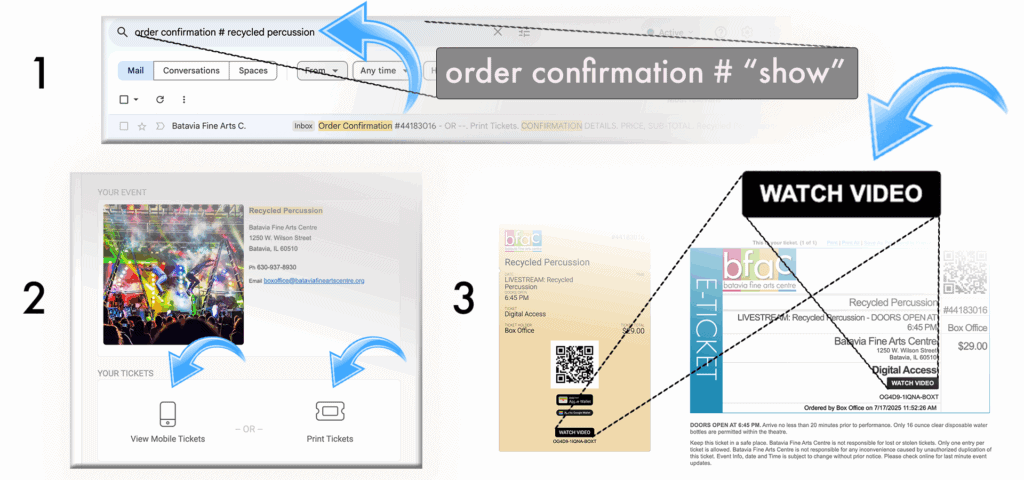
- Log into your patron portal or Check your email: You’ll receive a link from
boxoffice@bataviafineartscentre.org
Try searching “Order Confirmation # ‘insert show title’ ”
(Search your spam/junk folder if you don’t see it.) - Click the link to be taken to the livestream page.
- Tune in on time: Livestreams begin promptly at the listed showtime.
✔ We recommend joining 10–15 minutes early to ensure everything works. - Stable internet is key — connect to Wi-Fi or use a wired connection for best results.
▶️ Watching On-Demand (Available Anytime for 48 Hours):
- Log into your patron portal or Look for your email from boxoffice@bataviafineartscentre.org
It will include a link to view your on-demand rental. - Click the link, and the video will stream directly in your browser.
(No downloads required.) - Once you start playing the video, you’ll have 48 hours to finish watching.
- For the best experience:
- Use a desktop/laptop, smart TV, or tablet
- Make sure your internet connection is stable
- Keep the email handy — you’ll need the link each time
- Remember: On-Demand is restricted, and will only allow one (1) person to watch at a time.
💾 How do I purchase a Digital Download?
You can purchase Digital Downloads in two easy ways:
You can purchase Digital Downloads through our website or by contacting the box office. Events available digitally will be labeled accordingly.
- Online:
Visit our website and navigate to the event you’re interested in. If a Digital Download is available, it will be clearly labeled and available as a purchase option. OR 👉 Visit BFAC on air Digital Download Purchase. - Box Office:
Contact our box office directly at 630-937-8930 or email boxoffice@bataviafineartscentre.org to purchase your download or ask about availability.
📝 What’s Available?
- Most in-district performances (such as school concerts, recitals, and productions) are available as digital downloads.
- Some rental events also offer digital downloads, depending on licensing and performer agreements. Availability will be clearly indicated.
Where can I find my digital download email?
After purchase, an email will be sent from boxoffice@bataviafineartscentre.org.
📌 Search tip: Try keywords like
boxoffice@bataviafineartscentre.org"BFAC On Air Digital Download"
Check your spam, junk, or promotions folders if you don’t see it within a few minutes.
🍽️ By policy, we are not permitted to host sit-down meal events as part of facility rentals. This includes full banquets, plated meals, or buffet-style service inside any portion of the venue.
However, concessions and light refreshments may be allowed if:
- They are pre-approved by BFAC staff, and
- They are served in a way that does not disrupt operations or violate fire code.
✅ What other renters have done:
- Hosted their performance at BFAC and then held a banquet off-site at one of Batavia’s local event facilities.
- Provided boxed meals or to-go refreshments as guests exited the building, typically distributed outdoors or in the parking lot area.
We’re happy to help you find a solution that works within our guidelines while still meeting your event goals — just reach out to our team early in your planning process.
To ensure consistent quality and branding across all Batavia Fine Arts Centre (BFAC) platforms, renters must provide high-resolution images that meet the following specifications:
Required Image Sizes
Homepage image: 1960 × 860
Website portrait image: 800 × 880
Website event page image: 1960 × 600
Page list image: 400 × 300
Calendar image: 800 × 450
Ticket image: 600 × 200
Ticket poster: 630 × 630
File Requirements
File formats: .JPG or .PNG
Maximum file size: 25 MB per image
Resolution: 300 DPI, high-resolution images only
Design & Quality Standards
All images must be clear, professional, and suitable for digital use. Images that are pixelated, blurry, improperly sized, or of poor overall quality may not be used.
The Batavia Fine Arts Centre reserves the right to decline images and enforce BFAC design standards to maintain brand consistency and visual quality.